
Solid Color Background
Create and download a solid background color of choice at any resolution desired within seconds and absolutely free of charge. Whether you need an elegant solid color wallpaper for your iPhone, Android smartphone, MacBook, PC monitor, TV, tablet, or a completely customized resolution, all that is required is choosing a particular color and exporting it to your exact dimensions.
The Complete Guide to Plain Color Background
In the era of screens, when smartphones and wide monitors accompany us all day long, selecting appropriate digital backgrounds to spend time looking at matters more than one might think. Plain color backgrounds used to be perceived as the simplest kind of digital wallpaper for those users unable to find anything better. However, today such wallpapers are gaining momentum again as they become a consciously chosen aesthetic and psychological element preferred not only by professional web designers but also by gamers and common users.
The current article aims to investigate solid color backgrounds and color wallpapers in general as well as innovative ways of generating appropriate plain color backgrounds for various devices. The following discussion covers a wide variety of subjects related to such backgrounds, including their types, functions, and generation. Whether you want to get a soothing wallpaper in solid colour to use for a home office or a vibrant color background for a social profile, here you will find detailed answers to all your questions.
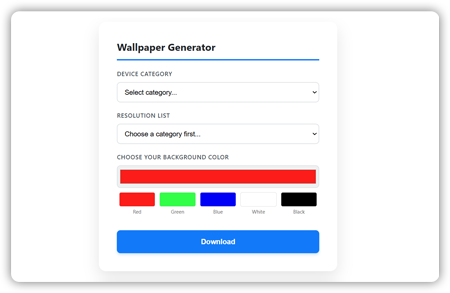
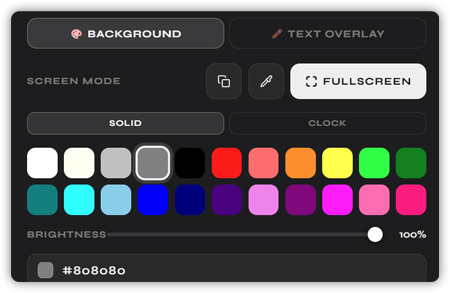
Using our free online tool available on this page, it is very easy to create a solid color background that can work on all types of devices and at all resolutions. You just have to select your device type, resolution, and then pick the color you want either using the color picker tool or entering its RGB, HSL, or HEX value. You can also define your own desired resolution. After finishing, just click download and you have your solid color background instantly.
The Rise of Solid Color Backgrounds in the Digital Age
In the early days of the internet, the more complex a wallpaper was, the better. But in the last decade, there has been a quiet but significant design revolution, inspired by the concepts of minimalism, simplicity, and conscious living. Millions of people today deliberately look for solid color wallpapers instead of intricate designs. There are many practical benefits of using plain color wallpapers, but there is also something psychologically satisfying about them.
As a design principle, minimalism has been embraced by global tech giants such as Apple and Google and countless user experience design studios worldwide. Studies have demonstrated that having a clutter-free desktop interface improves concentration and helps avoid distractions. Solid-colored backgrounds prevent any kind of visual conflict on the screen, allowing other elements like applications and icons to take center stage.
As research shows, it is possible to avoid visual clutter through the use of minimalistic wallpaper and calming colors. Otherwise, if the background is busy and full of details, there might be more distractions from the process itself. The selection of a solid color background can be compared to taking care of the mind in today’s world full of information.
The Science of Color: Why Background Colors Are Not Just Aesthetic Choices
Every simple-colored wallpaper is the result of extensive scientific research into the effects of various colors on our emotions, behaviors, and cognitive performance. Color psychology, which studies the impact of colors on our feelings and behavior, has been widely used in interior design, advertising, medicine, and even education for decades now. And its application can extend to the digital wallpapers that we look at daily as well.
According to Angela Wright, a leading color psychologist, there are four main psychological colors, each exerting its influence on our behavior: red motivates us physically and increases our productivity; blue increases our mental focus and creates calmness; yellow motivates our emotions and instills optimism; and green brings harmony. All other colors can be derived from these four colors along with their corresponding effects on our behavior.
Blue is considered one of the best background colors for work environments. Blue has the power to reduce stress and maintain concentration. The use of blue is popular in the corporate world as well as healthcare facilities because of the trust factor it builds. The reason behind using a dark or light blue solid background color in your work laptop is based on scientific principles, and not merely fashion.
Green is often referred to as the most balanced color because it brings out our connection with nature and makes decisions easier. Green can ease the strain in the eyes, especially for those who spend a considerable amount of time in front of a screen. On the other hand, red is a stimulating and exciting color; however, its excessive use could lead to irritability. Yellow is the symbol of the sun; thus, it can make you feel happy and creative.
In addition to color itself, the saturation and brightness are equally important aspects of color as well. Desaturated colors make up the neutral palette that is easy on the eye and helps avoid distractions. Backgrounds with high saturation can be invigorating for short periods but can lead to eye strain if viewed for a prolonged time. That is why productive people opt for backgrounds that have plain colors like pastel off-white rather than saturated solid colors.
Solid Color Backgrounds Across Devices: A Multi-Screen World
Among the most tangible challenges facing us today, with technology moving forward at such a pace, is the sheer amount of different devices people can have around them. A professional designer will be working on several screens like their laptop, additional monitor, and even a tablet. A gamer will need to set up multiple monitors, and so on. Wallpapers must fit Instagram, YouTube, TikTok, and any other channel used. A family will have a 65-inch smart television together with smartphones for each person. No universal solution for that problem exists anymore.
Here come modern background generators with their ability to generate perfect backgrounds of any color you want. The best websites today give people an opportunity to get the backgrounds of different sizes to match any device. You no longer need to resize your smartphone wallpaper or cut a background from your computer for another smaller screen; all you need is a couple of clicks and it will be done automatically.
Diversity of standard screen resolutions in 2025 and 2026 makes it clear why this feature is absolutely necessary. The standard resolutions for desktop and laptop computer users include 1920×1080 pixels, 2560×1440 pixels, 3840×2160 pixels, and even up to 5120×2160 for ultra-wide screen fans. Mobile resolutions include 1080×2400 pixels for premium Android phones and 1170×2532 pixels for modern iPhone smartphones, as well as higher-resolution flagships with screens of 1440×3200 pixels. Tablet resolutions span 768×1024 pixels for traditional iPads, 810×1080 pixels, and 820×1180 pixels.
Multi-screen computer workstations offer a different arithmetic. A typical example of dual monitors features two Full HD monitors that provide resolution of 3840×1080 pixels together. A triple monitor configuration is commonly employed by traders and video editors and four monitors is a choice of professionals. Creating the desired color backgrounds for such configurations and maintaining continuity of one color without any breaks across multiple monitors requires an intelligent approach and software understanding of this particular multi-monitor geometry.
Smart televisions bring another level of complexity, as they have set standards for Full HD screens at 1920×1080 and 4K displays at 3840×2160. Similarly, social media sites have their own standards for uploading pictures on cover pages, background images, and stories in Instagram, Twitter, LinkedIn, Facebook, and TikTok. A color background creator that works with such varied devices and resolution options would indeed be highly useful for professionals and laypeople alike.
How Modern Solid Color Background Generators Work
The best online generators for the creation of solid color backgrounds are characterized by both ease of use and high-quality results. On one hand, the process of using these generators is based on choosing a particular color, selecting a resolution, and obtaining a PNG file; however, some online applications exceed these basic functionalities.
Choosing the appropriate color is the first step in this process. Contemporary generators provide various color pickers, including gradient sliders enabling a user to browse the whole range of colors visually. A number of options allows entering specific numeric data in HEX, RGB, HSL, or HSV formats, which is crucial for design projects demanding accurate color specification.
It is in this part that the quality of the best programs truly shows itself off. Instead of forcing users to enter certain numbers of pixels for the desired picture size, a library of preset device profiles has been developed. Phone profiles take into account the latest iPhone and Android models at each level. Profiles of tablets include iPad, Android tablet, portrait, and landscape options. Profiles of laptops and PCs are designed for screens ranging from budget HD to ultra-premium 8K. Presets for social networks are also taken into account. Special needs can be satisfied by entering any resolution size, using pixel dimensions.
The output format does not fall behind the input parameters in importance. PNG format should be used as the output format when choosing only color backgrounds. There are several reasons for this – the format is fully lossless, color is displayed perfectly and accurately, it supports transparency, and the format itself is supported by any software of any OS and any social network. A PNG color background will look equally accurate on Samsung Galaxy, MacBook Pro, gaming PC running Windows, and LG OLED TV.
The download happens very quickly as the image is ready instantly without any watermarks and also without the need for any account or compromise in any way like the ones made on other stock photography websites. It is this convenience that has made the solid color wallpaper software extremely popular among users.
The Aesthetic Case for Solid Colors for Wallpaper
Aside from the practical and psychological considerations, there is also an important aesthetic reason to use solid color backgrounds. Colors that are solid are, quite literally, timeless. In contrast to the photographic wallpapers that will inevitably grow dated, a well-chosen dust rose or dark teal solid color background wallpaper stays beautiful forever. This makes solid colors an especially good choice when investing one’s creative energies into designing a background.
The idea of solid color backgrounds also fits well with the larger theory of digital decluttering. According to minimalist design principles, stripping away unneeded objects helps free up mental capacity to pay attention to what is really important. If one uses color wallpapers on his computer, cell phone, and iPad, he will have an easier time transitioning between these different platforms since his eye will already be used to seeing them.
Brand conscious individuals and organizations find value in being able to create perfectly accurate plain colors backgrounds according to the organization’s color schemes. The accurate color scheme of the company such as its perfect shade of blue or green at the right resolution on every device used by the organization can make a big difference. Solid branded backgrounds have proven themselves useful for organizations as part of their communication strategy.
The same goes for social media users who use backgrounds as solid colors for personal or organizational use. When creating images, product photos, portrait shots, or any other graphic materials, one can use solid colors as the background. This way the user can get an accurate, professional look for his or her work and can develop a unique background that will always serve well.
Choosing the Right Solid Color Background for Every Device and Purpose
In the modern era, the true difficulty lies not in the technicality of the process but in the curation of one’s design. Which color is best suited to the computer screen in your home office? Which color is appropriate for a phone wallpaper that does not distract? Which color should you use for your channel art on YouTube to give your brand a polished look? Below, you’ll find some research-backed advice about what colors may be the best choice for you.
For backgrounds of devices you plan to use for working, cool colors tend to work best. Cool blues from steel to cerulean encourage focus and reduce eye strain. Soft greens and mutes of teal offer a similar effect with added warmth. It’s also important to avoid using either pure black or pure white backgrounds when you’re trying to work, since the former can cause oppressive, low contrast and the latter causes glare and increased strain on your eyes.
The choice for phone wallpaper is also based on personal taste, although practicalities are taken into account as well. The lock screen and home screen wallpapers work together with your application icons and widgets. A deep dark solid color background will make your icons stand out and give a professional feel to your wallpaper. Light or pastel solid color backgrounds harmonize nicely with dark icon themes. More saturated middle color backgrounds may be quite dramatic yet difficult to read against specific widget designs.
In the case of multiple monitors, a great option would be to use one or two very similar colors for all your wallpapers. This way you have created a background field which does not distract you from your work but rather works in the background. Users with double and triple monitors tend to pick a color which fits in well with their working environment. For example, a wooden desktop suggests warm backgrounds like beige or amber; a white desktop works well with cool backgrounds like gray or blue.
For social media and applications that involve creating content, more saturated and bold colors are usually suitable. Coral, electric blue, and emerald are some of the colors that can help create the impression required on social media. When creating backgrounds for social media, accurate dimensions are key because even a slight error when creating the background will result in the image being distorted by the application.
The Technical Advantage: Why PNG Is the Gold Standard for Color Wallpapers
Choosing the file format for downloading color wallpapers from solid color background generator is a critical decision to be made, since there can be serious implications from such choices. Portable Network Graphics (PNG), without exception, is a universal format of choice, which becomes apparent when one grasps the reasons behind this.
First of all, PNG is characterized by lossless compression, meaning that no details are lost during compression and no data distortion occurs. For example, if you choose to generate a plain color background in a certain hex color – let us say, the specific lavender color of #C5A3D0 – then you can expect your color image to look absolutely identical in each reproduction of it. On the other hand, even though JPEG images are compressed more efficiently, they involve lossy compression, which distorts the color and generates visible artifacts, especially in case of big areas of solid color.
In addition, PNG files include support for the alpha channel, a feature that is useful to those who require solid color backgrounds with some transparency. This could be useful for laying over other design elements, creating videos, or designing webpages. The PNG file format is also compatible with all major computer operating systems (Windows, Mac OS, iOS, Android, Linux), as well as all major web browsers.
One thing that could make PNG files heavier than JPEGs is file size. However, the file size of a PNG containing only solid colors would not be a problem. Even a PNG of a single solid color at full 4K resolution (3840×2160 pixels) is likely to have a file size of less than 1MB, often less than 100KB.
Multi-Monitor and TV Setups: Specialized Needs for Backgrounds Solid Colors
The increasing use of home offices, gaming consoles, and professional desktops has led to a significant increase in multi-monitor setups. Knowing the precise technical parameters of such a setup is critical when creating an ideal color background.
Creating an actual spanned background, where multiple monitors are seen as one big screen, requires calculating the total resolution of all the displays. In case of a two-Full HD setup, the required image size would be 3840×1080 pixels. If three 1080p monitors are involved, the background should have a resolution of 5760×1080 pixels. Calculating the necessary resolution for ultra wide screens with ordinary displays can get even more complicated. A good solid color background creator with built-in presets for multi-monitor displays eliminates the need for such calculations, but a custom option is also available.
Smart TVs have their own particularities as well. There are numerous occasions where the TV is used as an ambient screen even when it’s not in use in many living rooms or home theaters. If selected correctly, the usage of simple colors as a background image shown on a 65- or 75-inch OLED or QLED screen can create a remarkable atmosphere that will fit the interior perfectly. Deep blue and green colors can be particularly eye-catching on a high-contrast screen, while earthy colors such as terracotta or ochre make a TV look like a piece of artwork.
The Future of Plain Colored Backgrounds and Wallpaper Tools
As screens become ever more ubiquitous — foldable screens, rollable screens, screens integrated into automobiles and household devices, augmented/mixed reality interfaces — the need for customizable and device-specific plain color backgrounds will increase. The option to create a specific shade at a particular resolution and then download that as a seamless PNG is a trend that will become even more common.
Another step forward in this realm has been the integration of the ability to create gradients with that of creating plain colors. Gradients can be thought of as the middle point between detailed images and plain solid color backgrounds. In essence, they provide a bit of variation compared to plain color background, while still being neat and tidy — two qualities that make solid background designs attractive.
With the development of color science and display technology, our ability to define and replicate colors on various monitors becomes increasingly accurate. The use of HDR (High Dynamic Range), wider color gamuts, and sophisticated color calibration techniques allows us to observe more of the 16.7 million colors available in the digital domain. In such an atmosphere, a system that lets the user define colors with a high level of accuracy and export them in a file format that retains such detail becomes crucial rather than just a luxury.
It is safe to say that personalization has always been at the core of how people interact with their digital worlds. In much the same way that people will paint their walls, hang pictures, and rearrange furniture in their homes to communicate who they are and what kind of atmosphere they are trying to create for themselves, people have always worked hard to tailor their digital worlds according to their personality and taste. Selecting the perfect color of background on all devices, from one’s phone, laptop, monitor, tablet, and even television screen, is an art form that can be accomplished by everyone, in every resolution, and every color available.